
Implementation guide · Bandura PSI 1.4.1
Install Bandura PSI on WordPress and make it ready for work.
A practical path for webmasters, agencies and practice managers. Go from the ZIP file to a fictional test client, with separate permissions and Pro integrations configured without exposing clinical data.
No card for the trial. Purchase and licensing are managed by Freemius.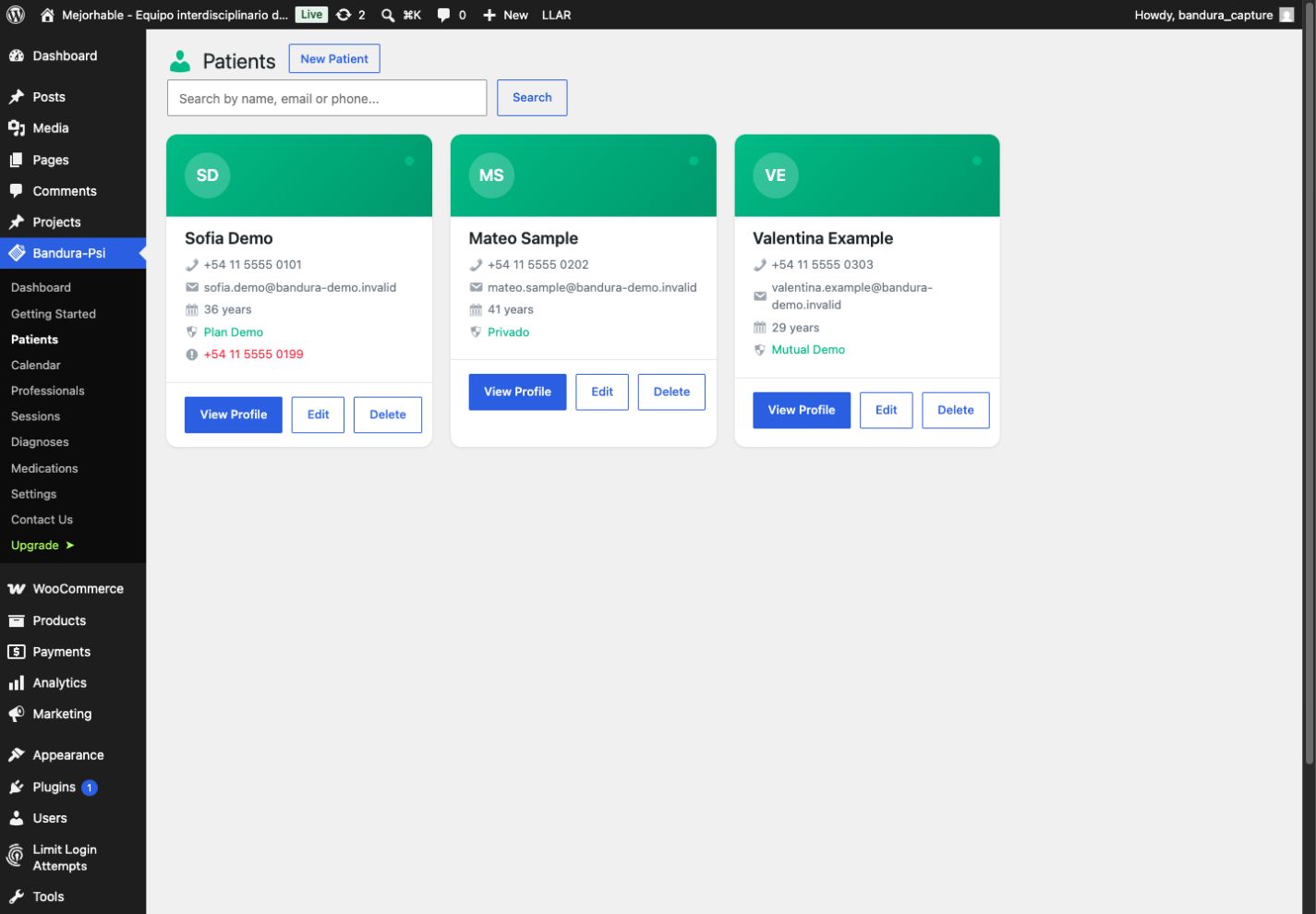
WordPress 5.8+ and PHP 7.4+
Complete English, Spanish and Portuguese interface
Data stored in your own WordPress
01 · Preparation
Five minutes of checks prevent a half-finished setup.
Bandura installs like any WordPress ZIP plugin. Before you begin, confirm the site and its administrator meet these requirements.
- WordPress 5.8 or later running PHP 7.4 or later.
- WordPress administrator access to install and activate plugins.
- A recent backup and, whenever possible, a staging environment.
- HTTPS and a stable public domain when connecting Google Calendar.
- Email already configured in WordPress or SMTP server details for Pro reminders.
02 · Installation
From the ZIP file to the Bandura workspace.
You do not need FTP or theme changes. Activation creates the plugin structure and opens the initial flow inside WordPress Admin.
-
01
Download the ZIP
Use the Freemius delivery link after purchase or when starting the trial. Do not extract the file.
-
02
Upload it to WordPress
Open Plugins → Add New → Upload Plugin, choose the ZIP and select Install Now.
-
03
Activate Bandura PSI
Activate the plugin when WordPress finishes. For Pro, complete the Freemius license activation when prompted.
-
04
Choose the language
In Bandura PSI → Settings → General, select English, Spanish, Brazilian Portuguese or the WordPress default.
03 · Team access
The webmaster installs it. Each practitioner signs in with their own account.
Bandura uses native WordPress authentication. When adding a practitioner, create a new account or link an existing one by email; WordPress sends the password setup flow, so the administrator never needs to know the password.
Configures and manages Bandura.
Can see all plugin data, create practitioners and manage integrations. This role does not grant general access to WordPress plugins, themes, pages or users.
Works only with their own clinical information.
Sees Bandura and their own clients, appointments, sessions, diagnoses, prescriptions, notes and Google Calendar connection. They cannot access another practitioner’s records.
Practitioner is the default role. Administrator must be selected explicitly.
04 · Validation
Test the complete workflow with fictional data.
Do not use real information during implementation. This test confirms permissions, scheduling and follow-up before handing the system to the practice.
-
01
Create a test practitioner
Use an email controlled by your team and keep the Practitioner role.
-
02
Sign in as that user
Confirm the account lands in Bandura and does not see unrelated WordPress administration menus.
-
03
Add a fictional client
Create a minimal client record and a future appointment using invented names and details.
-
04
Check isolation
For multi-practitioner sites, confirm each account sees only its own clients and records.
05 · Pro automation
Calendar and email work without sharing accounts between practitioners.
Pro features are optional. The Free core does not expire and has no limits on clients, practitioners or clinical records; Pro adds integrations and reminders.
One private connection per practitioner.
The webmaster configures the OAuth application and callback URL. Each practitioner then connects and revokes their own Google account. Sync is one-way from Bandura to the primary calendar.
- Requires HTTPS and an exact authorized redirect URI.
- Sends a generic title, date and time; location is included only when enabled by the administrator.
- Never sends the client name, email, phone, diagnosis, medication, notes or clinical history.
Use WordPress email or Bandura’s built-in SMTP.
Choose WordPress email when the site already uses a transactional provider or SMTP plugin. Choose Bandura PSI SMTP to configure host, port, encryption and authentication inside the product.
- STARTTLS commonly uses port 587; implicit SSL/TLS commonly uses port 465.
- Unencrypted relay is only for controlled local networks explicitly documented by the host.
- Send a test and verify delivery before enabling 24, 48 or 72-hour reminders.
06 · Production
Hand over the system with a short, repeatable check.
Plugin data stays in the site database, but security and compliance also depend on hosting, WordPress and the practice’s policies.
- Update WordPress, PHP and Bandura to supported versions.
- Use HTTPS, unique passwords, least privilege and tested backups.
- Confirm WP-Cron runs; Calendar and reminders depend on scheduled tasks.
- Repeat the email test and review spam, SPF, DKIM and DMARC with the domain provider.
- Delete every fictional client, appointment and account created during setup.
- Explain that Bandura organizes records but does not generate diagnoses or replace clinical judgment.
07 · Support
A technical issue can be investigated without exposing sensitive data.
For support, send versions, browser, operating system, reproduction steps and an anonymized screenshot. Always reproduce with a fictional client.
- Never send SMTP passwords, a Google Client Secret or OAuth tokens.
- Do not include client names, diagnoses, notes or screenshots containing clinical information.
- Share the exact error and non-sensitive rows from Settings → System status.
- State whether the issue continues with a default theme and non-essential plugins disabled.
Support is provided to the license holder. With agency licenses, the webmaster or agency handles routine administration and first-line support.
Implementation questions
Is Bandura a SaaS product?
No. It is a plugin installed inside WordPress, and its data stays in that site’s database.
Can I use Free without client limits?
Yes. Free does not expire or limit clients, practitioners or clinical records. Pro adds Google Calendar, built-in SMTP and reminders.
Does each practitioner need a WordPress account?
Yes. Bandura creates or links one native account per practitioner and applies plugin-specific permissions.
Can an administrator connect another person’s Google Calendar?
No. The administrator configures the OAuth application, but each practitioner authorizes and revokes their own Google account.
Does Bandura guarantee HIPAA or GDPR compliance?
Not automatically. Compliance depends on hosting, access, backups, policies and the laws that apply in each jurisdiction.
Bandura PSI · WordPress
Install it, validate it and hand it over with a clear workflow.
Try every Pro feature for 14 days with no card, or buy the one-site license for USD 79 per year.